A digital job sheet app for SMART repair
Swap the paper job sheet, the invoice book and the disclaimer pad for one app on your technician’s Android phone. The job, the photos, the invoice and the customer’s signature, finished before they leave the drive.
Everything the paper job sheet had, and more
Each job goes to the technician’s phone when the office saves it, and stays there with or without signal.
- The customer, car, work and booking checks, plus dated notes from the office, shown first with a notification.
- A Before and After photo for each repair, taken in the app and kept with the job.
- Extra damage found on site sent to the office with a photo. Once the office authorises it, it’s added to the job and the phone is told, or it’s booked as a new job if the customer has already signed.
- Work that can’t be repaired marked with the reason, so the customer, dealer or insurer can be told.
- Several cars on one visit, each with its own work, photos and invoice.
The invoice and disclaimer, signed with a finger
No more chasing signatures or retyping invoices at the end of the week.
Check the details
The technician confirms the number from their invoice book and how the customer is paying, and can see which repairs still need an After photo.
Sign the invoice
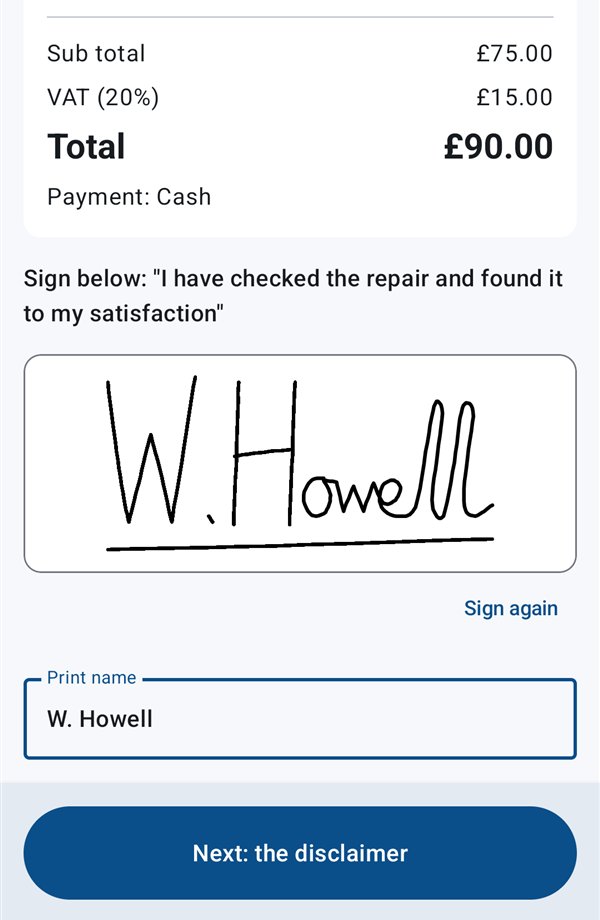
The customer sees the work and the total, with the Before and After photos, and signs with a finger. Insurance customers aren’t shown a price.
Sign the satisfaction form
The customer signs to say they’re happy, or accepts the repair with conditions. The signed PDFs, with your logo and details, reach the office as soon as the phone has signal.
Paperwork that sorts itself out
Weekly paperwork pack
For each technician: the timesheet, invoices and disclaimers in one download.
Your invoice numbers
Technicians type the number from their own invoice book, the app suggests the next one, and the office can correct a number if needed.
Into Xero
Signed invoices go into Xero as drafts or approved, one at a time, or by themselves within about ten minutes of signing.
Full job history
Every change recorded and every job searchable, for when a customer calls back.
Questions about job sheets
What happens if the technician has no signal?
The app keeps working. Jobs, photos, signatures, quotes and fuel receipts are saved on the phone and sent as soon as there’s coverage. Asking for time off, the timesheet, sending the weekly mileage and showing the fuel card need signal.
Can we keep our own invoice book numbers?
Yes. Technicians use the number from their own invoice book, the app suggests the next one, and the office can correct a number if needed.
Does the customer get a copy?
Private and trade customers can be emailed “your repair is finished”, in your colours, with the signed invoice and a link to their own repair page: their Before and After photos, the paperwork and how to pay. Insurance customers aren’t sent the invoice, the price or the photos.
What if the customer isn’t fully happy with the repair?
They can accept it with conditions instead, ticking the reason on the satisfaction form, such as a finish or colour that can’t be matched to the usual standard. The reasons are yours to edit.
Does it work on iPhone?
Not yet. The technician app is for Android phones. The office website works on any computer, tablet or phone.
Related pages
Put the invoice book away
Start a 30-day free trial with no card, or book a 20-minute demo.