Software for alloy wheel repair businesses
Book kerbed alloys, refurbs and diamond-cut work in the office, send each job to the right technician’s phone, and get the invoice and satisfaction form signed on the customer’s drive.
No wasted trips
Most wasted wheel visits come down to the same few things. The office asks about them when the job is booked.
- Is the locking wheel nut there? Is the car key?
- Is there power for your kit, and room on the drive for the repair and the van?
- Are the wheels clean, and has the customer agreed the type of repair?
- Any “no” is flagged on the office jobs board and on the technician’s phone, so it’s sorted before anyone sets off.
- Your own checks too. Change the list to suit your work, up to 20 checks.
Every wheel accounted for
Put each wheel on its own line of the job, with its own price, and the technician works through them on their phone.
Before and After, wheel by wheel
A Before and an After photo for each repair, taken in the app and kept with the job.
Another wheel kerbed?
The technician picks the wheel (NSF, OSF, NSR or OSR), adds a photo and sends it to the office to authorise.
Too far gone
A cracked wheel, or damage too deep to repair, is marked with the reason and shows as no charge on the invoice.
No signal, no problem
Jobs, photos and signatures are saved on the phone and sent as soon as there’s coverage.
A satisfaction form written for wheel work
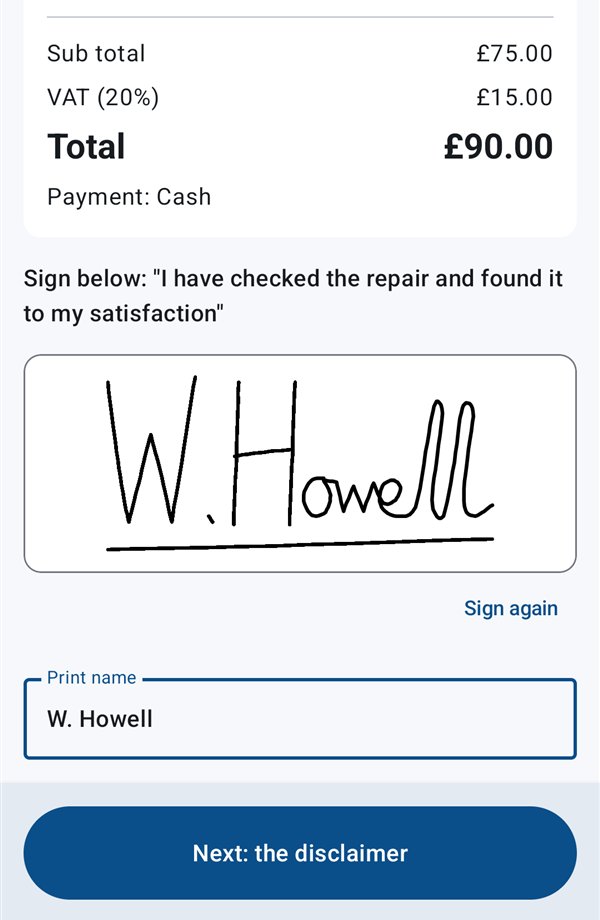
The customer signs the invoice and the satisfaction form with a finger, before your technician drives away.
- The standard wording covers wheels: overtightened, corroded or damaged wheel nuts, TPMS sensors, tyre damage found during the repair, and a reminder to recheck the wheel nuts.
- Conditional acceptance when the customer would rather have a cosmetic repair than a diamond cut, or the finish can’t be matched to the usual standard.
- Your wording, if you prefer. Every line can be changed in Settings.
- Your invoice book numbers, with the next one suggested by the app.
Whoever the wheels belong to
Dealer days
Several cars on one visit, each with its own work, photos and invoice, made out to the dealer’s account. Dealers are saved once and picked next time.
Private customers
A booking confirmation and a reminder the day before, then “your repair is finished” with a link to their Before and After photos, all in your colours.
Insurance wheel claims
Claim forms read into jobs, invoices made out to the insurer, and no price shown to the customer. More on claim forms.
The rest of a wheel business
Your price list
Your usual prices, picked in the office or when quoting on the road, so quotes and invoices match.
Days in driving order
Add each technician’s home postcode and their jobs are put in driving order, with leave-home and arrival times.
Who does wheels
Note which technicians do alloys, and the office gets a gentle warning if a wheel job goes to someone who doesn’t.
Comebacks
Warranty work booked free of charge and linked to the original job, with its photos.
Questions from wheel repairers
Can we price each wheel separately?
Yes. Each wheel can be its own line on the job, with its own price from your price list, its own photos and, if it can’t be repaired, its own reason. The invoice lists every wheel.
What if the technician finds another kerbed wheel on the day?
They report it from the phone: pick the wheel and add a photo. Once the office authorises it, it’s added to the job as extra work and the phone is told, or booked as a new job if the customer has already signed.
Can customers send us photos of their wheels for a price?
Yes. Switch on the “Get a price” page and link to it from your own website. Customers send up to five photos, and the request lands on your Quotes page. Email them a price, they accept it online, and it becomes a job ready for you to book.
Does it work on iPhone?
Not yet. The technician app is for Android phones. The office website works on any computer, tablet or phone.
Related pages
Try it with your own wheel jobs
£20 per technician a month, with £40 covering your first 2. Start a 30-day free trial with no card.